Group alarms: wake up together as a study group or team
Start a group, set the time, days and missions. Everyone's alarm rings at once, each person finishes their own mission, and the chat opens 15 min.
Key takeaways
- Everyone in a community rings at the same moment, and each person stops their own alarm by finishing their own mission.
- The founder sets the name, time, days, group size (4 to 200) and which missions members may pick from.
- The time follows the founder's time zone, so members elsewhere ring at their local equivalent.
- The group chat is open for writing for 15 minutes from the alarm time, then stays readable.
- Free accounts can be in one community. Premium lets you join as many as you like and create up to 3.
On this page 8 sections
A group alarm rings for everyone in the group at the same moment, and each person turns off their own by finishing a mission. In Alarm Mate, an iPhone alarm app, anyone can start a community, set the time, days and allowed missions, and the group chat opens for 15 minutes.
Exam week. It’s 6:30 AM, and eight phones in eight bedrooms go off at the same second.
One of you is already doing squats. One of you is solving math problems with one eye open. One of you is, as usual, still asleep.
Then the group chat starts to fill: “Alex woke up with 20 push-ups and joined the chat.” Then another, and another. The person who’s still asleep will see all of it when they finally get there.
That’s the difference between a group alarm and a group chat where someone types “wake up guys” at 6:31. Communities are the group side of Alarm Mate as a social alarm.
What a group alarm is
A group alarm is one alarm time shared by several people: it rings on everyone’s phone at once, and each person has to deal with their own.
That’s different from a shared calendar event. Galarm, for example, describes its group alarm as one that “goes off at the same time for all the participants, and they can confirm or decline” (Galarm on the App Store). That’s a good fit for reminders.
In Alarm Mate there’s no confirm or decline. There’s a mission, and the alarm keeps going until you finish it.
Some newer apps link everyone’s alarms and show who was on time and who slept in. That’s useful, and it’s also just watching: everyone still turns their alarm off the normal way.
In a community, the wake line in the chat means something happened. “Alex woke up with 20 push-ups” is only there because Alex did 20 push-ups.
Starting one
Go to the Communities tab and create a “New Community”. The form asks for:
- A name. “Name your group”, up to 30 characters. “Exam Week 6:30” fits. “The Organic Chemistry Survival Society 6:30 AM” does not.
- An alarm time, in 15-minute steps.
- Which days it repeats.
- A group size: 4, 8, 20, 50, 100 or 200 people. The default is 20.
- Who can join, and how. Public or Private, and whether people have to “Request to join”.
- “Which wake-up tasks can members pick?” More on this below, because it’s the most important setting.
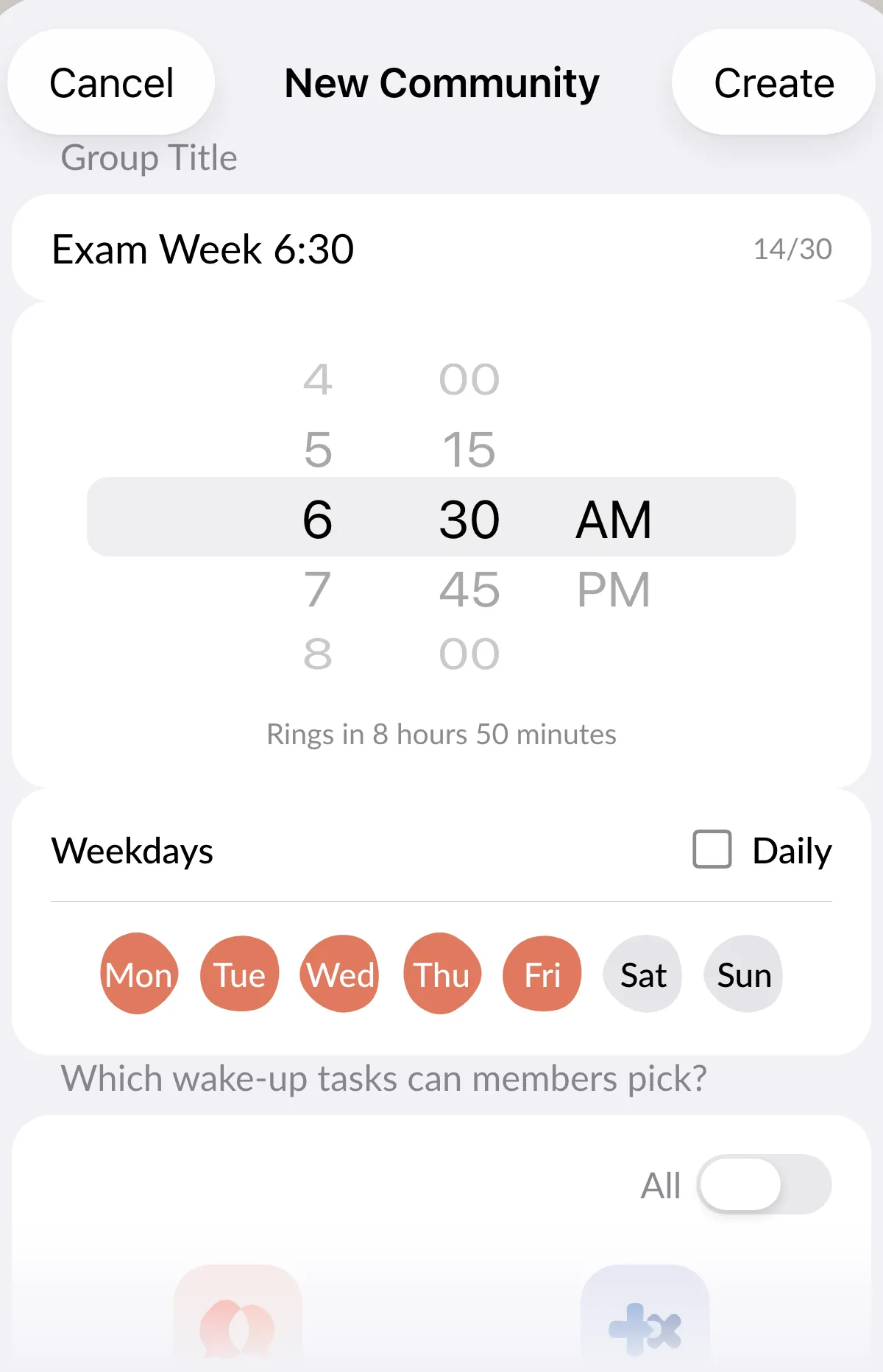
The founder sets the menu; members pick from it
Whoever creates the community decides which missions are allowed, and each member picks their own missions from that list. So the group has a character, and each person still has a say.
A few setups that work:
- Study group: Math Problems and Typing. Your brain is warmed up before you open the textbook.
- Gym crew: Push-Ups and Squats. If you’re going to be sore later anyway, you might as well start now.
- Team: Walk Away from Bed and Sky Photo. Everyone ends up standing near a window, which is better than the pillow.

Everyone rings together, everyone dismisses alone
When the time comes, every member’s alarm rings at the same moment.
After that, it’s personal. Each member does their own mission and turns off their own alarm, with no shared progress bar and nobody waiting on the slowest person.
If you force-quit the app before a group alarm, it has a message ready for you: “Your group is counting on you, keep me open!”
The 15-minute group chat
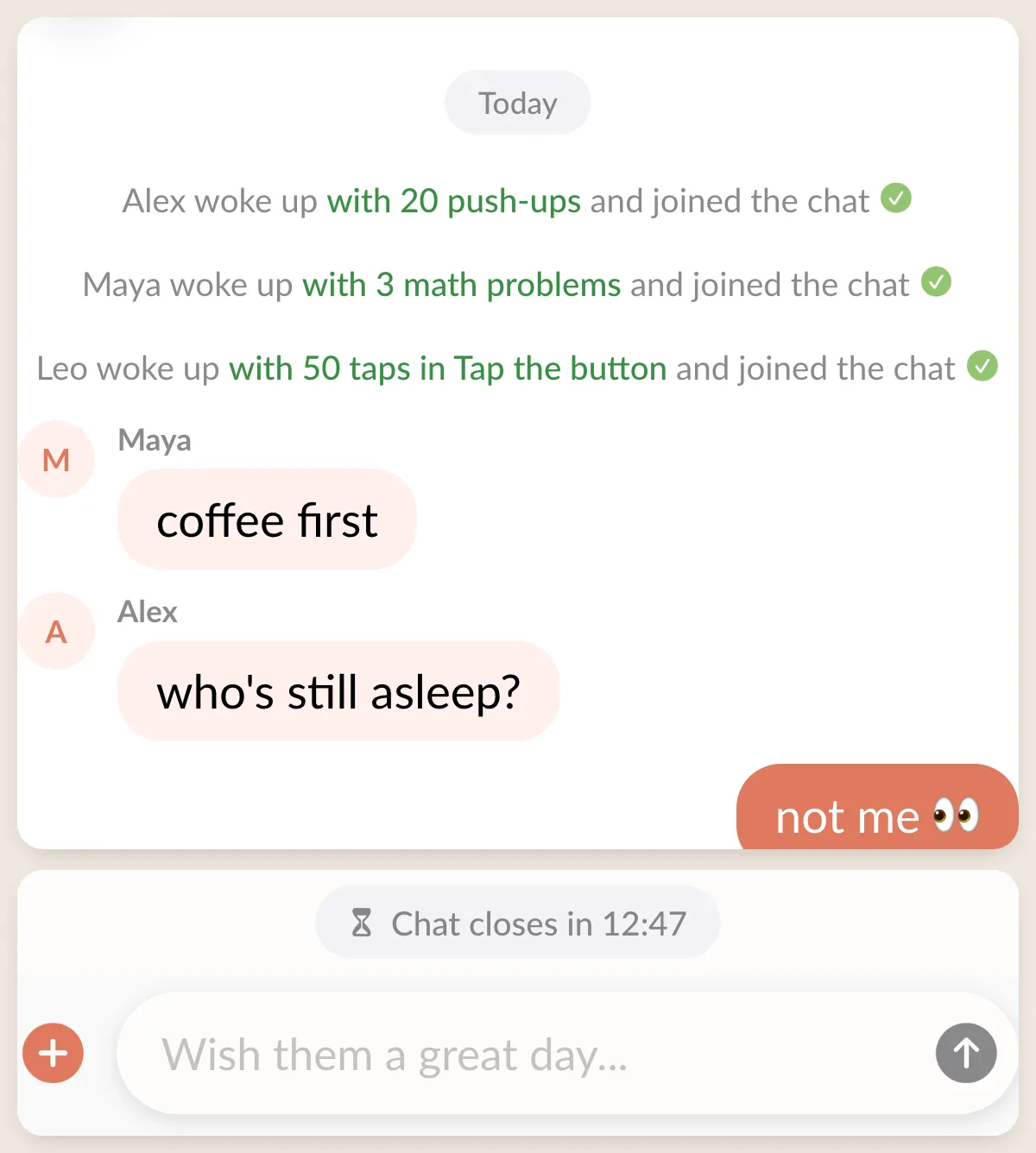
Finish your mission and you land in the group chat. Every time someone else finishes, a line shows up with their name, their mission and how much of it they did: “Alex woke up with 20 push-ups and joined the chat.”
You see the group assemble in real time, one wake-up at a time.
The chat is open for writing for 15 minutes from the alarm time, and a countdown at the top shows it: “Chat closes in 12:41”. After that it goes read-only.
The history stays, and any member can read it whenever they like, so tomorrow’s chat picks up where today’s left off. (One-on-one buddy chats work differently; those are deleted after 24 hours.)
Recipes
Four setups to copy, from a small study group to a whole team:
| Group | Time and days | Missions | Size |
|---|---|---|---|
| Exam week study group | 6:30, weekdays | Math Problems, Typing | 8, Private |
| Early practice (sports team) | 5:45, practice days | Push-Ups, Squats, Walk Away from Bed | 20 or 50, Private |
| Remote team before standup | 8:15, weekdays | Walk Away from Bed, Sky Photo | 20, Private |
| Friends fixing their sleep schedule | 8:00, every day | Tap the Color, Selfie | 4 or 8, Private |
Study groups have the problem this solves. This post title collected over 1,300 upvotes on r/GetStudying:
“Anyone else turns off their alarm with zero memory of doing it?”
A mission, plus eight people who’ll see whether you showed up, is a hard combination to sleep through.
If it’s just the two of you, a Friends alarm is simpler. If you want the full back-and-forth of a one-on-one morning, with a lobby and a live race, that’s the buddy morning. And after any group morning you get a share card you can post to the Mornings feed.
Limits
- Free accounts can be in one community. Premium ($3.99/month or $29.99/year, no free trial) lets you join as many as you like and create up to 3.
- Every member needs an account and an iPhone with iOS 26 or later. Alarm Mate is on the App Store.
- The time follows the founder’s time zone.
- Writing in the chat closes after 15 minutes. Reading doesn’t.
- “Let a friend pick” isn’t available on community alarms. Members pick from the founder’s list instead.
- Every mission is free, on every tier.
FAQ
Does everyone have to finish before anyone’s alarm stops?
No. Each member’s alarm stops when that member finishes their own mission. Nobody else’s morning affects yours.
Can I make it private?
Yes. Set the community to Private when you create it, and choose whether people need to request to join.
What if members are in different time zones?
The alarm rings at the same moment for everyone, at the time set in the founder’s time zone. Members elsewhere get it at their local equivalent, so plan around that.
Sources
- Galarm, App Store listing
- Reddit, r/GetStudying, “Anyone else turns off their alarm with zero memory of doing it?”
Related posts
BeReal for mornings: you can only post if you woke up
A feed of how people woke up: push-up videos, sky photos, result cards, streaks. You can only post on a day you actually woke up with the alarm.
How to wake up a friend from far away
Invite a friend to wake up at the same time, and if they're still asleep when yours rings, ring them once, loudly. How it works and what you need.
What happens at 7:00 when a stranger wakes up with you
Both alarms ring. You land in a lobby, wait for your buddy or start now, watch them live, race the same mission, then chat. The whole morning.
Tomorrow morning, don't do it alone.
Alarm Mate is on the App Store for iPhone. Solo alarms are free, and so is every mission.